A two-column layout can look balanced on a desktop and become confusing on a phone. The problem is often the reading order rather than the width alone. Before styling the columns, decide which content should come first when everything becomes a single vertical sequence. That order should still explain the subject without visual side-by-side clues.
For example, a service comparison might put a heading and description in each column. Keeping each complete item together allows the columns to stack sensibly. Placing all headings in one row and all descriptions in another can separate the labels from their explanations on a narrow screen. The desktop grid should not be the only thing holding the meaning together.
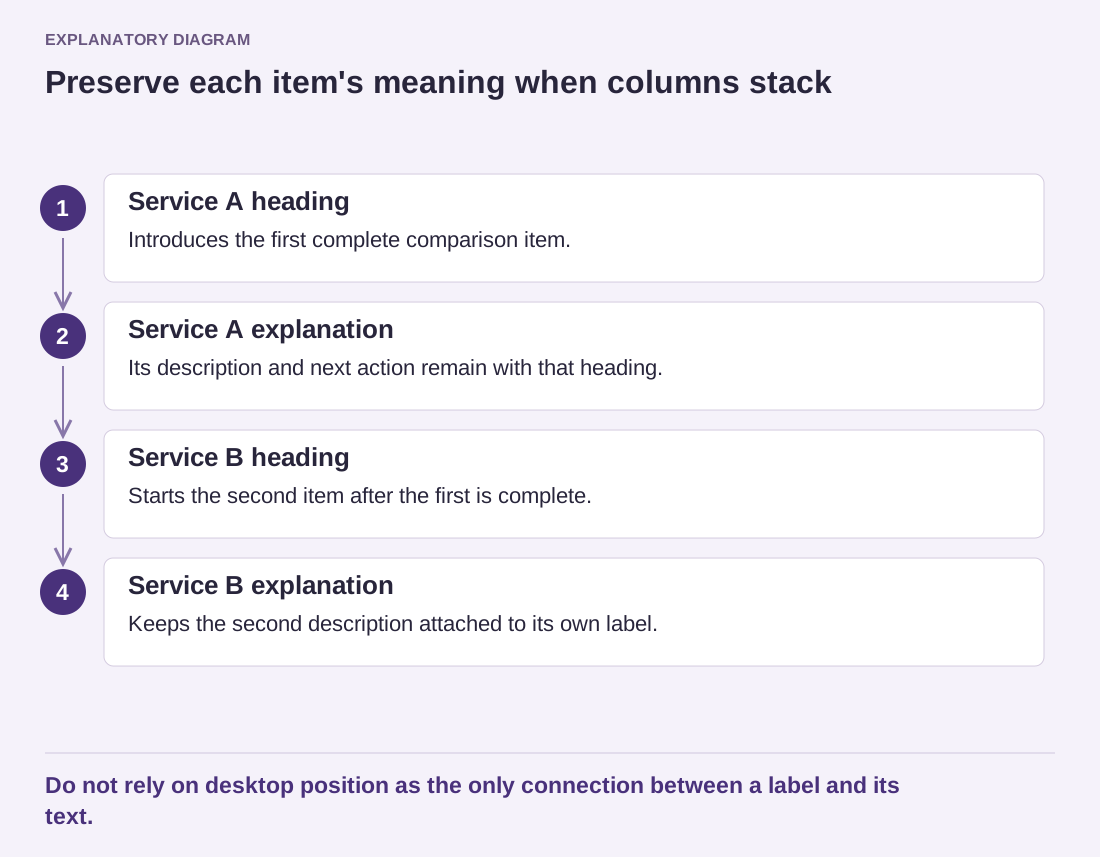
Read the diagram as text
- Service A heading: Introduces the first complete comparison item.
- Service A explanation: Its description and next action remain with that heading.
- Service B heading: Starts the second item after the first is complete.
- Service B explanation: Keeps the second description attached to its own label.
Do not rely on desktop position as the only connection between a label and its text.
A useful stress test is to replace a short placeholder with the longest credible wording the section might need. Then widen and narrow the window slowly. Watch the point where a button wraps, a heading gains a line or an image becomes too small to explain its subject. These transitions reveal whether the composition depends on a lucky text length. You do not have to design for absurd input, but ordinary variation should not break the relationship between a label and its explanation.
Use the Columns block's supported settings and inspect the theme's actual responsive behavior. Some controls affect whether columns stack, while theme styling can influence spacing and widths. Avoid prescribing one breakpoint as correct for every site. The important test is whether the real content remains readable at the widths visitors use.
Long words, URLs and button labels deserve attention. They can push a column wider than expected even when ordinary paragraphs fit. Test the longest realistic label rather than a short placeholder. Where possible, rewrite an awkward label clearly instead of forcing tiny text into a fixed-width box.
Images should support the same sequence. If an image belongs to one explanation, keep it inside that item's structure rather than using its desktop position as the only association. Check cropping after stacking, because the available proportions can change. A decorative picture should not force readers through excessive scrolling before reaching the next useful paragraph.
Finally, review a medium-width window as well as a narrow phone. The uncomfortable point may occur before the layout fully stacks. If columns become cramped, simplify their content or change the arrangement instead of treating mobile as an afterthought. A responsive section is successful when it preserves relationships across widths, not merely when every object stays somewhere inside the screen.