A palette is easier to use when each color has a role. Start with text, surfaces, links and emphasis rather than collecting attractive swatches without a plan. The same green can work as a large background and fail as small text on white. A color's usefulness depends on the combination and the job it performs.
Choose a dependable text-and-background pair for the main reading area. Then establish a recognizable link treatment and a limited set of accent uses. You do not need a different color for every section. Too many competing accents can make ordinary information look like a warning or an urgent action.
Check contrast using an appropriate contrast checker, especially for small text and controls. Looking at the page on one bright monitor is not a reliable measurement. Test the actual foreground and background values, including colored panels and button states. A palette that works on the homepage can still fail in a footer or a notice box.
Make meaning survive without color
If a comparison uses green for included and red for unavailable, add words or another clear indicator. A reader should not need to distinguish those hues to understand the information. The same applies to form feedback and selected navigation items. Color can reinforce meaning, but it should not carry the entire message alone.
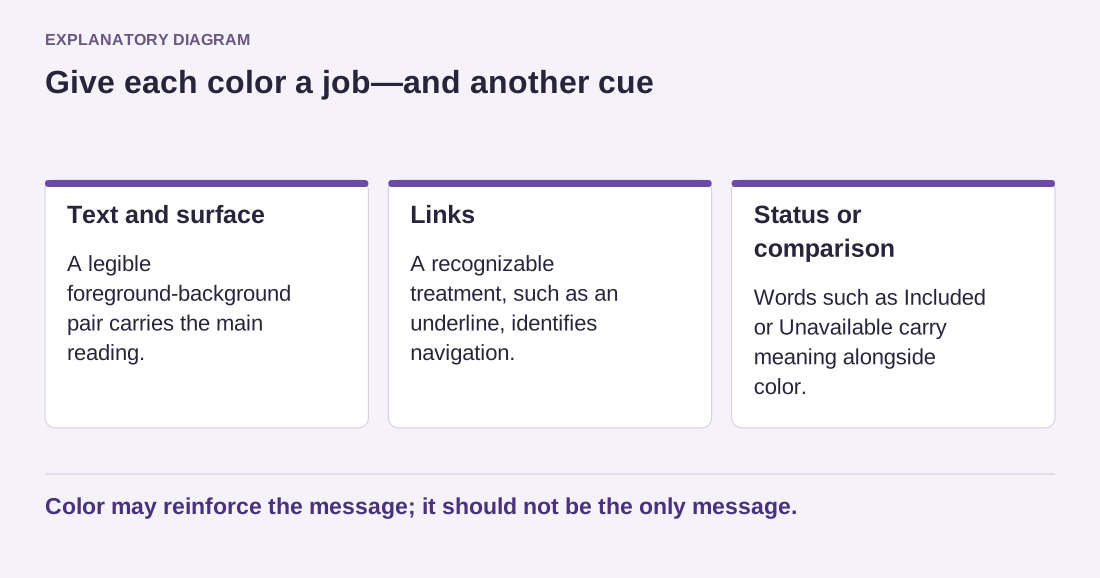
Read the diagram as text
- Text and surface: A legible foreground-background pair carries the main reading.
- Links: A recognizable treatment, such as an underline, identifies navigation.
- Status or comparison: Words such as Included or Unavailable carry meaning alongside color.
Color may reinforce the message; it should not be the only message.
In a block theme, shared palette and style controls can help keep choices consistent. Individual overrides remain possible, so inspect existing blocks before assuming a global adjustment has changed everything. A one-off color selected during drafting can become an accidental exception that persists after the main palette is revised.
Create a small reference page or private sample with a paragraph, link, button, heading and colored panel. Review it on a phone and in the actual site context. Keep the palette compact enough that another editor can identify the right choice without guessing. A useful color system makes ordinary decisions easier while leaving room for a specific exception when the content genuinely needs one.