Two-factor authentication adds another check to a password-based login. On self-hosted WordPress it is commonly supplied by a plugin or identity provider rather than built into every core login. The recovery procedure therefore depends on the implementation you actually use.
Read that procedure while you still have working access. Some systems provide recovery codes, alternative enrolled devices or an administrator-assisted process. Do not assume the hosting company can restore access to an external identity account, or that a password reset bypasses the second factor.
Save recovery codes in a controlled place separate from the device that generates your normal codes. A screenshot stored only on the same phone does not help if the phone is lost. Treat the codes as credentials: anyone who obtains a valid code may be able to use it for recovery.
Rehearse without disabling the protection
Follow the provider's supported method to verify recovery. If testing consumes a single-use code, mark it as used and refresh the set when appropriate. Keep another authorized route available during setup so a mistake does not lock out the only administrator.
Plan for a phone replacement before erasing the old device. Transfer or reenroll the authentication method according to its instructions, then verify the new device. Remove obsolete devices and codes through the service's own controls. Simply copying an app icon to a new phone does not prove that its authentication data moved.
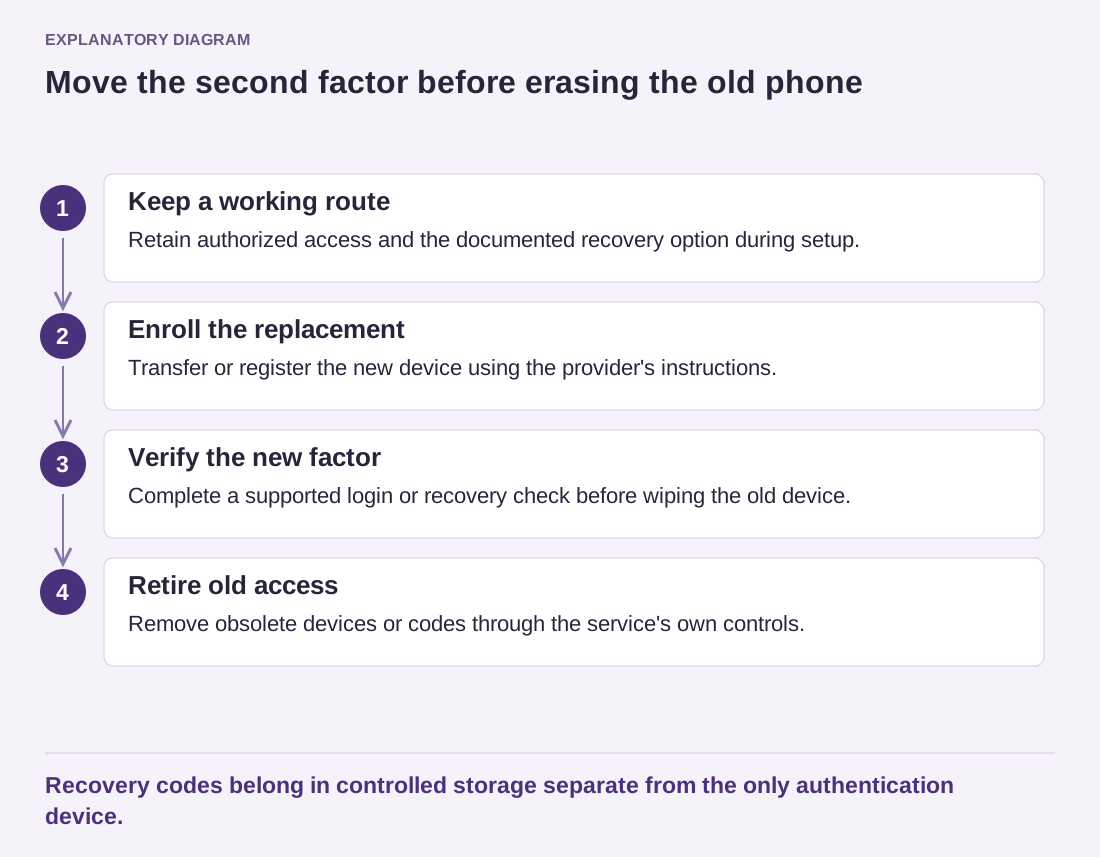
Read the diagram as text
- Keep a working route: Retain authorized access and the documented recovery option during setup.
- Enroll the replacement: Transfer or register the new device using the provider's instructions.
- Verify the new factor: Complete a supported login or recovery check before wiping the old device.
- Retire old access: Remove obsolete devices or codes through the service's own controls.
Recovery codes belong in controlled storage separate from the only authentication device.
Use individual accounts for collaborators. A shared second factor held by one person's phone can turn that person's absence into an outage for everyone. Each person should understand their own recovery process, while the organization maintains appropriate ownership of administrative access.
If access is lost, use the documented recovery channel and verify the identity of anyone offering help. Do not post recovery codes or account secrets in public support messages. The aim is to preserve both availability and the additional protection, rather than creating an undocumented shortcut that undermines the reason for enabling two factors.