A theme or plugin package contains executable code. Installing it is a different decision from downloading a photograph or reading a PDF. The source should be identifiable and connected to the product's actual maintainer.
For directory software, use the official WordPress listing and confirm the name and author. For commercial software, use the vendor's authenticated download route. A search result advertising a free copy of a paid extension may distribute a modified package, even if its screenshots look identical to the original.
Do not treat popularity as proof that every copy is genuine. A familiar product name can appear on unrelated download sites. Compare the domain and the account used to obtain it, and avoid following unexpected update links sent through unverified messages.
Check the maintenance route too
Find out how future updates arrive. A package obtained outside the supported route may not receive fixes or may depend on an unknown updater. Saving a little on the initial download can leave the site running code whose origin and maintenance nobody can explain.
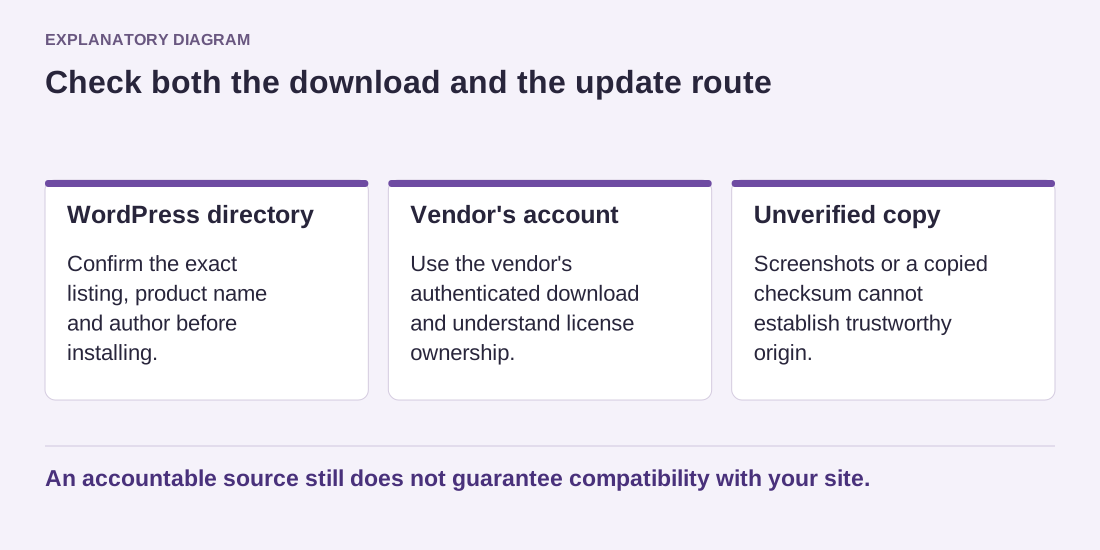
Read the diagram as text
- WordPress directory: Confirm the exact listing, product name and author before installing.
- Vendor's account: Use the vendor's authenticated download and understand license ownership.
- Unverified copy: Screenshots or a copied checksum cannot establish trustworthy origin.
An accountable source still does not guarantee compatibility with your site.
If the vendor publishes a checksum or signature, follow its documented verification method. A checksum copied from the same untrusted page as the download does not establish trustworthy origin. For ordinary dashboard installations, use the supported process rather than adding unnecessary manual steps from an unrelated tutorial.
Keep a record of the installed edition and account owner. This is especially useful when a contractor supplies a premium component. The site owner should know whether continued updates depend on the contractor's license and what happens when that arrangement ends.
Before installing on a live site, review the requirements and make a recoverable backup. Test the needed feature in an appropriate environment. An accountable source reduces one kind of uncertainty, but it does not guarantee compatibility or eliminate the need for updates. Continue evaluating the software's actual behavior and maintenance after the first installation.