A page cache can keep a ready-made response for a public address instead of asking WordPress to rebuild equivalent output for every visitor. That is especially useful when many people request content that has not changed. The cache is a delivery shortcut, not a second authoritative copy of your articles.
The important word is equivalent. Two requests to the same path are not always entitled to the same response. A logged-in account, a shopping cart, a private area or a form token can change what is safe to reuse. Cache rules need to respect the application rather than treating every address as a public brochure.
Find the cache you already have
Ask the hosting provider whether it supplies page caching before installing another system. A host control panel, a plugin and a CDN may each offer related features. Write down where the public HTML is cached, how it is invalidated and which requests bypass it. You do not need to memorize every technical header, but someone responsible for the site should be able to explain those boundaries.
Take a simple publication as an example. Most anonymous readers see the same article, so a stored response may be appropriate. An editor viewing a draft must see a different state. A reader sending a comment should not receive a stale confirmation belonging to another request. The article, the draft and the submission are connected parts of the same site, yet they need different handling.
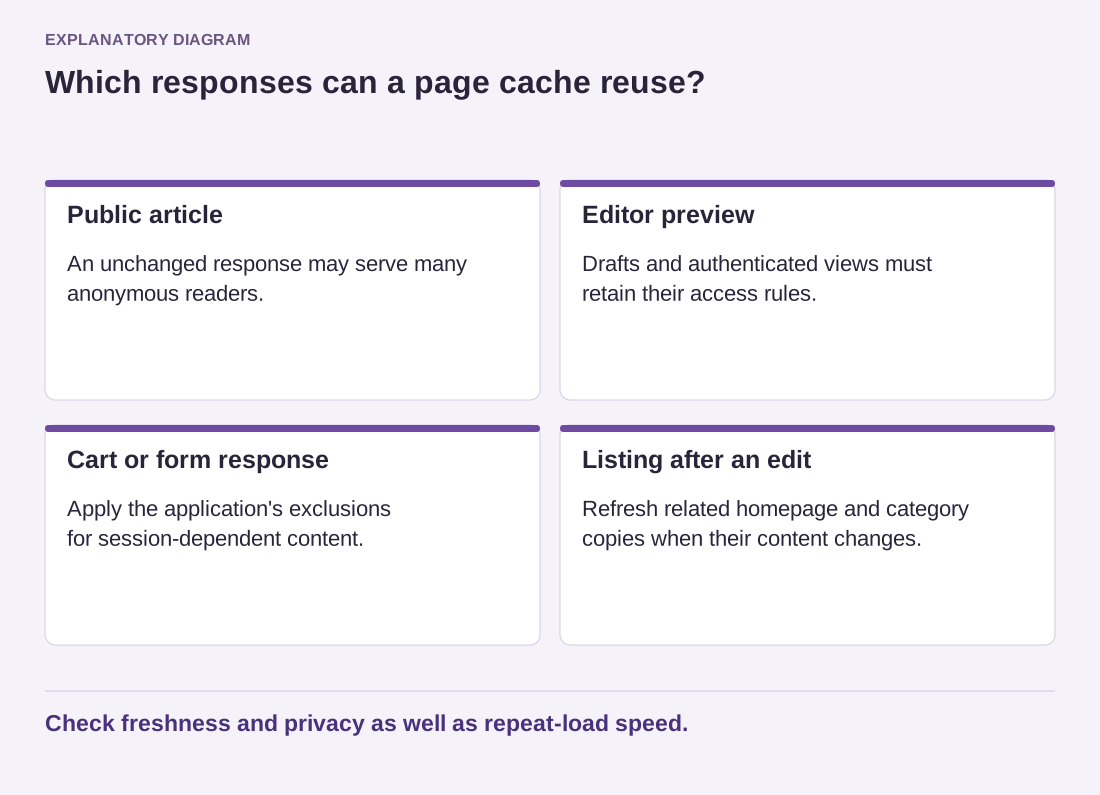
Read the diagram as text
- Public article: An unchanged response may serve many anonymous readers.
- Editor preview: Drafts and authenticated views must retain their access rules.
- Cart or form response: Apply the application's exclusions for session-dependent content.
- Listing after an edit: Refresh related homepage and category copies when their content changes.
Check freshness and privacy as well as repeat-load speed.
Test freshness as well as speed
On a safe test site, make an unmistakable change to a public page. Confirm that the public version updates through the normal publishing workflow. Then check the relevant category and homepage if they also display the changed content. A cache that refreshes one article but leaves its listing stale is not fully integrated with that workflow.
Check private and dynamic features separately using appropriate test accounts. Never use real customer information as a convenient cache test. If the software documentation says a route must be excluded, preserve that exclusion; a slightly better speed score is not a reason to expose another person's content.
Know what happens when the cache is cleared. The next visits may need to rebuild responses, so a temporary change in performance is not surprising. Repeatedly emptying every cache can prevent you from seeing the benefit you intended to measure.
The useful outcome is a predictable public page: current after an edit, quick to reuse when unchanged, and separated from content that depends on a person's session. Evaluate all three, not just the quickest repeat request.