An administrator account can be convenient when nobody wants to investigate a missing menu. It also gives a collaborator far more control than many publishing tasks require. Start with what the person must do and select access that supports that work.
WordPress roles contain sets of capabilities. In a standard single-site installation, an Author can publish and manage their own posts, while an Editor can manage content from other authors. A Contributor can prepare their own posts but cannot publish them or upload files by default. Plugins and custom code can change these defaults.
That distinction matters in an ordinary editorial workflow. A guest writer who submits drafts may fit the Contributor role, but an image-upload requirement needs a deliberate solution. Making the writer an Administrator merely to expose the media button solves the wrong problem.
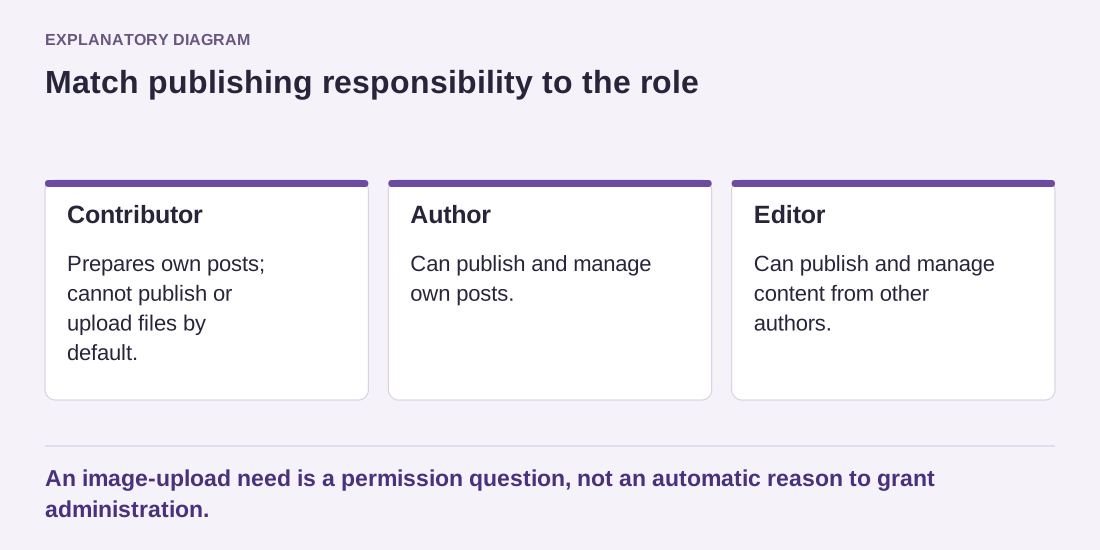
Read the diagram as text
- Contributor: Prepares own posts; cannot publish or upload files by default.
- Author: Can publish and manage own posts.
- Editor: Can publish and manage content from other authors.
An image-upload need is a permission question, not an automatic reason to grant administration.
Test the real task with the real role
Create or use an appropriate test account and perform the assigned task. Check both what the person can do and what they should not be able to change. An administrator's view is not evidence that another role can reach the same screen.
Custom roles can help when built-in responsibilities do not fit, but they require maintenance. Record the capabilities added and the reason. Avoid collecting unrelated privileges each time a plugin displays an error. Consult the extension's documentation to identify the actual requirement.
Keep administration separate from routine writing when appropriate. A person who maintains software may also publish articles, but daily content work does not always need the more powerful account. Use individual accounts so access can be removed without disrupting everyone else.
For example, a volunteer may need to update event descriptions but should not change the site's theme or install extensions. Start with the role supported by the event tool, then verify whether it exposes other records the volunteer should not see. If no built-in role fits, ask for a narrowly defined capability change rather than a broad promotion. Keep a test event available so the permission arrangement can be checked again after an extension update.
Review permissions when responsibilities change. A temporary contractor should not retain permanent administrative access after completing a narrow task. Before removing an account, consider content ownership and any integrations tied to it. The desired result is not the smallest possible role name; it is a tested set of permissions that matches the work and limits unnecessary control.