Lazy loading postpones work until a resource is nearer to being needed. On a long article, that can avoid downloading every image before the reader reaches it. The idea becomes less helpful when it postpones the very image that gives the first screen its meaning.
Do not begin by enabling or disabling lazy loading everywhere. Look at the initial viewport and identify the content a visitor needs immediately. A large opening photograph, a small logo and an image near the bottom of a long article have different priorities. A global switch may treat them too broadly.
Check what the theme actually outputs
WordPress, the theme and optimization plugins can all influence image-loading attributes or scripts. Inspect the public image element and its request timing. The name of a setting does not guarantee that every image receives the behavior you expected, especially when a page builder or background-image component is involved.
For an opening image that arrives late, determine whether its request is being delayed. If so, test an appropriate exclusion using the responsible tool's documented controls. Keep the change narrow. Removing useful lazy loading from dozens of off-screen images may add unnecessary transfers without addressing other reasons the first image is slow.
Imagine a travel article with one important introductory photograph and a gallery far below. The first picture helps the reader understand the page; the gallery may never be reached. Loading both groups identically ignores that difference. A sensible configuration lets the introduction appear promptly while postponing the distant gallery until it is relevant.
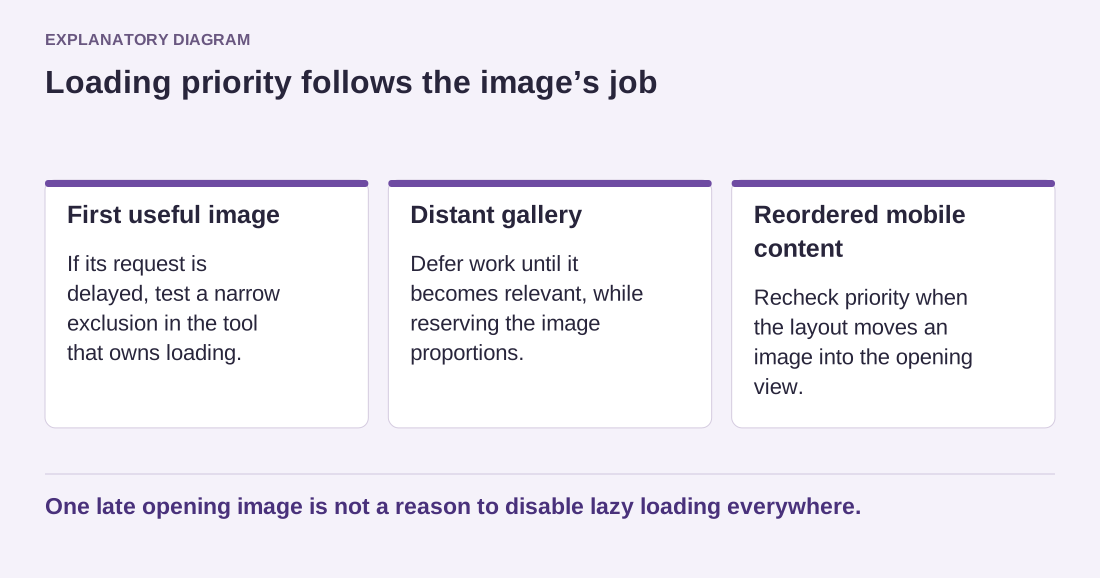
Read the diagram as text
- First useful image: If its request is delayed, test a narrow exclusion in the tool that owns loading.
- Distant gallery: Defer work until it becomes relevant, while reserving the image proportions.
- Reordered mobile content: Recheck priority when the layout moves an image into the opening view.
One late opening image is not a reason to disable lazy loading everywhere.
Verify scrolling and reserved space
After changing the behavior, scroll through the whole page at a realistic pace. Images should appear in time without leaving persistent empty blocks or moving nearby text unexpectedly. Keep their proportions available so the layout can reserve space before the downloads finish.
Test more than one screen size. An image below the fold on a large desktop can become the first useful image in a different arrangement, and a mobile design may hide or reorder sections. Avoid deciding priority solely from one screenshot of the editor.
If several tools add their own lazy-loading behavior, simplify the overlap before trying increasingly complicated exclusions. Record which system owns the feature and how an editor can mark an exceptional image. The result should be a predictable reading experience, not a collection of undocumented settings that happen to produce one good test score.