A reader is halfway through a sentence when a photograph appears above it and pushes the paragraph away. Nothing necessarily failed to load, yet the experience is frustrating. Layout stability is about preserving the place where content belongs while the page becomes ready.
Start by watching the page from its first appearance rather than opening it only after everything has loaded. Repeat on a constrained connection and at a phone width. An image, banner, font or embedded widget that arrives later may expose a movement you never notice on a warm desktop visit.
Leave room for content that arrives later
Images should provide enough size information for the browser to reserve their proportions before the file finishes downloading. In a responsive layout, the displayed width can change while the intended aspect ratio remains known. Check the actual markup and layout: a theme or custom component can undo the useful information supplied by an ordinary image block.
An embedded video presents a similar design problem. If a page initially reserves almost no height and then inserts a large player, the text below must move. A stable placeholder with the expected proportions gives the later content somewhere to appear. When several player sizes are possible, test the real mobile and desktop configurations instead of choosing a height that works only in one screenshot.
Text can move too. A late font may change line breaks, turning a two-line heading into three lines and displacing the introduction. Compare the fallback and final type, including long Spanish words and accented characters if the site is bilingual. Font choices are not only about the appearance of isolated letters.
Read the diagram as text
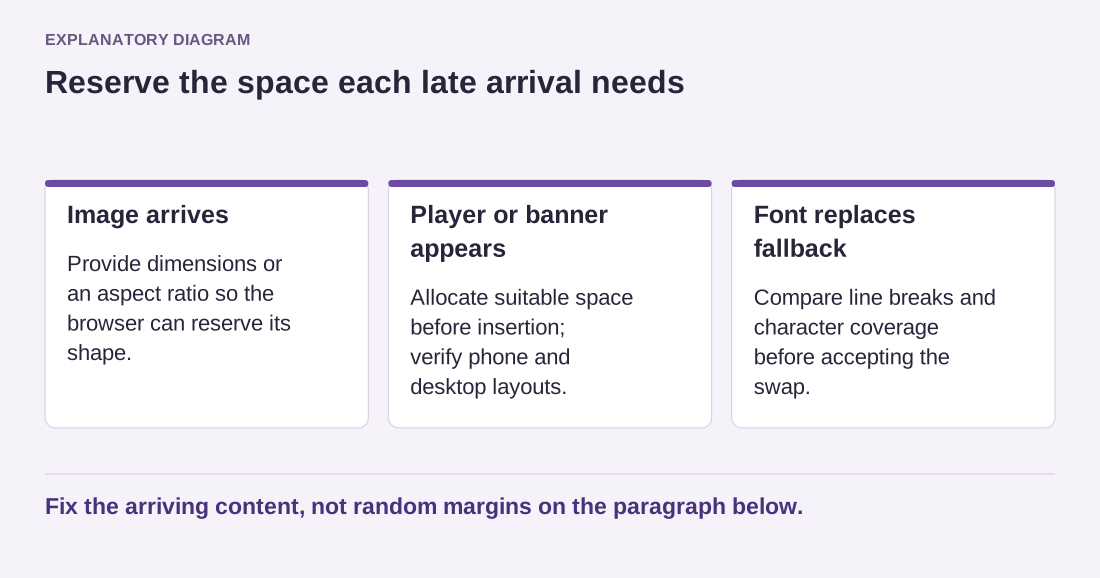
- Image arrives: Provide dimensions or an aspect ratio so the browser can reserve its shape.
- Player or banner appears: Allocate suitable space before insertion; verify phone and desktop layouts.
- Font replaces fallback: Compare line breaks and character coverage before accepting the swap.
Fix the arriving content, not random margins on the paragraph below.
Distinguish the cause from the moved item
A diagnostic tool may highlight the paragraph that shifted, while the cause is a new item inserted above it. Investigate the sequence rather than adding margins to the highlighted paragraph. Random spacing can hide one symptom at one width and leave the underlying insertion unchanged.
For example, a promotional strip added at the top after a delay will move the whole page below it. Decide whether that strip belongs in the initial layout, can appear in already reserved space or should be presented differently. The correct choice depends on its purpose, but it should not surprise someone who has begun reading.
After the adjustment, reload without relying on a warm cache and repeat the original interaction. Scroll, open navigation and wait for delayed content. A stable first screen is useful; a stable reading experience requires looking beyond that first moment.